
|
|



Set Up Electronic Bill Pay |
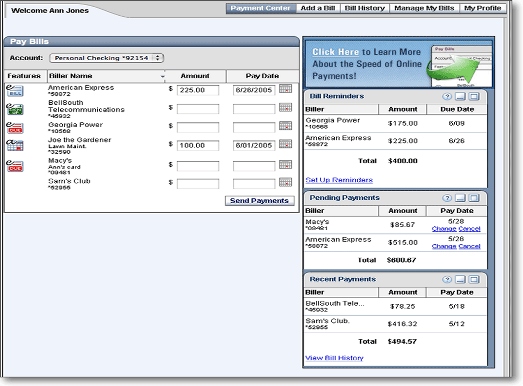
Set up online banking and bill pay, This is one of the nicest things you can do to take some stress out of your life. Almost all banks do this for free now. Go to your banks web page and set up a user ID if you don't have one. Then go to the bill pay section and follow the instructions for your bank. If you have not done this already, try it and you won't regret it. |
Although it is possible to set up your bills for automatic payment, I recomend paying them manualy, at least until you have a budget up and running. There are just too many situations that can cause problems with automatic payment. The only situation I have found that auto payment is good for is paying rent. Rent payments don't usualy have a decent grace period like loans and most other bills do, so if you have a strict policy for your rent payment, it may be a good idea to set up auto pay for rent. If you are going to use auto pay, you should read my chapter on Extreme Bugeting. That is it!! You now have the ability to make life a lot easer. I would recommend checking out my Extreme Budgeting Page. It is for those who have a hard time budgeting. It may be helpful even if you are doing well with your budget. Once you get an understanding for how this system works, you will find little variations of how to make it work best for you. Internet banking creates a lot of ways to spread out your money and do it fairly simple. If you have made it this far, Congratulations! Please go to my Contact Page, and leave me some feedback. I will do what ever I can to make this a better web site. Your coments are welcome. I would especially like to hear from you if you have applied the system for a few months. Enjoy the peace of mind! |
This is an example of what bill pay looks like |